How to Create an Interactive Learning Experience with Nexus
Aug 31, 2026
A good online course is about more than the quality of the individual lessons.
You can have clear videos, useful exercises and well-designed quizzes, and students can still struggle with the overall experience. They may not remember where they left off, overlook important content or keep seeing lessons that were only relevant when they first started.
This becomes more noticeable as a course grows.
A small linear course with ten lessons is relatively easy to navigate. A membership with 200 lessons, bonus content, seasonal training, downloads and different learning paths is a different story altogether.
At that point, the challenge is no longer only to create good content. You also need to help students find and use that content at the right moment.
On the fast lane? Read the summary!
In the first article in this series, we looked at the foundations of a good online course. In the second, we zoomed in on the individual lesson and explored how video, audio, activities and quizzes can create a better learning experience.
Now we are zooming out again and looking at the course environment itself because once your content is good, there is another question to ask: How can the environment around that content help students keep moving?
This is where Nexus comes in.

Most online courses are fairly static.
The traditional course structure is simple and familiar. You create modules, add lessons and quizzes, and students move through the course in a certain order.
Kajabi supports exactly this kind of setup. For many courses, it works perfectly well, but not every course stays small and linear.
You may have a membership where new content is added every month, a large certification program, a resource library, onboarding content or bonus lessons that are only relevant at certain moments.
In those situations, showing all available content in one fixed structure can become less helpful. The content may still be excellent, but the student has to do more work to decide what deserves attention now. Additionally, the more content you add, the more important that becomes.
A good learning environment helps reduce decisions.
When someone logs into your course, they should not have to spend unnecessary energy figuring out how the course works.
Ideally, the environment helps answer three practical questions:
- Where am I?
- What should I focus on now?
- What should I do next?

Imagine opening a membership with 300 lessons. From the creator's perspective, that looks like an impressive amount of value. From the student's perspective, it may also look suspiciously like 300 things they have not done yet.
A useful comparison is Netflix or another streaming service. You know there are thousands of titles available, but Netflix does not present its complete library as one enormous list. Instead, you see smaller collections and a limited selection within each one.
The same principle can work well in a larger course. A Nexus collection may contain 20 lessons, for example, while you choose to show only the next three. As students complete lessons, new ones can take their place.
The rest of the content is still there. Students simply do not have to deal with all of it at once. You might also highlight the next logical step, bring seasonal content forward when it becomes relevant or create a small selection of recommended lessons instead of giving everything equal visual importance.
The goal is not to hide value. It is to help students focus on what is useful now.

What do we mean by an interactive learning environment?
When people hear the word interactive, they often think about quizzes, clickable exercises or drag-and-drop activities. These are certainly forms of interaction, but we use the term more broadly.
An interactive learning environment can also mean that the course itself responds to what a student does.
For example, a welcome lesson can disappear from a featured section once it has been completed.
A new lesson can become more prominent. A message can appear after someone finishes an important module, or a reward can become visible when a milestone is reached.
The student is still working with the same course content, but the way that content is presented can change along the way. This is the difference between a fixed course library and an environment that responds, at least in simple ways, to progress.
Why this matters for learning
A new student needs something different from someone who is halfway through a course. At the beginning, students usually need orientation. They want to know how the course works, where to start and what to expect.
A returning student often wants something much simpler which is to continue. Someone who has already completed most of the course may be looking for a specific resource or an advanced lesson rather than another reminder to watch the welcome video.
In a small course, this difference may not matter much. In a larger course or membership, it starts to affect how easy the environment feels to use.
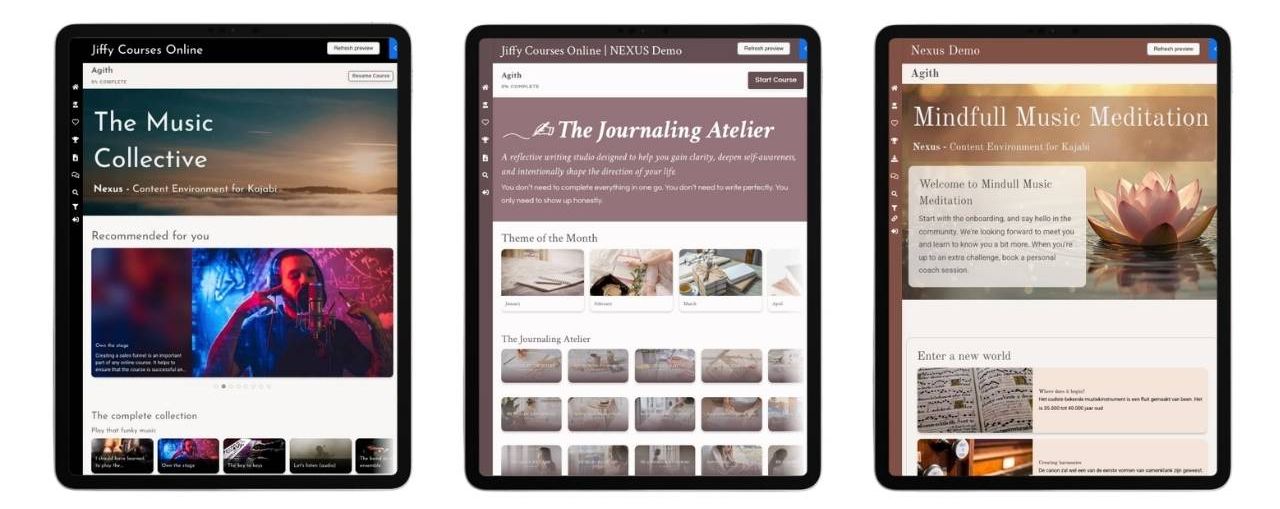
This is one of the ideas behind Nexus. You can create areas that highlight specific lessons or collections, and those areas can change based on what a student has already completed.
A lesson that was important during onboarding can disappear from a featured section once it has done its job. The lesson itself is still available in the course. It is simply no longer taking up prime real estate on the dashboard six months later. This may sound like a small thing, but it allows the course environment to move with the student instead of remaining frozen at day one.
Navigation is only a part of the experience.
Good navigation is important. Students need to understand the structure of the course and be able to find lessons and resources, yet finding content and knowing what to do next are not quite the same thing.
A student may be perfectly capable of navigating through 12 modules and still have no idea which lesson deserves their attention today. This is where guidance becomes useful.

With Nexus, you can use different sections of the dashboard for different purposes.
Depending on the course, you might have areas such as:
- Start here
- Continue learning
- New this month
- Recommended resources
- Downloads
- Favorites
- Rewards
You do not need all of these, and more sections certainly do not automatically create a better course.
The purpose is to give different content a different role. A welcome section may be important in week one and almost irrelevant in month six. A resource area may become more useful later, once students have enough context to know what they are looking for.
The course can still contain everything, but the environment helps decide what gets the most attention.
Let completed content make room for what comes next.
Onboarding is probably the easiest example. A welcome video can be very useful when someone first enters a course. It can explain how everything works, where to begin and what to expect. After the student has watched it, though, that welcome video has largely done its job. There is usually no reason for it to remain the first thing they see every time they return.
With Nexus, completed lessons can disappear from certain featured areas. Once the welcome lesson is completed, the next relevant lesson can take its place. The lesson itself has not been deleted. Students can still find it again if they need it. It is simply no longer competing for attention.
The same principle can work for starter collections, seasonal content, featured lessons or other content that is especially useful during one stage of the learning journey, or specific time of the year. If students find something they do want to return to later, they can save it as a favorite instead of relying on completed content to remain permanently visible.
This keeps the experience focused without removing access to the wider course.
Use messages when something important happens.
Sometimes the course does not need to change dramatically. It just needs to acknowledge that the student did something. Perhaps they completed their onboarding, finished an important module, reached a milestone or earned a certificate.
In many online courses, the response is simply that a lesson now has a completion checkmark. That is functional, but some moments deserve a little more recognition.


With Nexus, you can use pop-ups for messages linked to certain completions or milestones. That could be a short congratulations message, an explanation of what happens next or a reminder that a certificate is now available. You can also add a burst of confetti to make an important moment feel a little more like an achievement.
Of course, you probably do not need virtual fireworks every time someone completes a three-minute lesson. But at the right moment, a small response can make progress feel more visible, make the next step clearer and give the student a sense that, yes, they actually achieved something.
Gamification can help, but it is not the whole story.
Gamification often brings to mind points, leaderboards and competition. These can be useful in the right setting, but they are only one part of a motivating learning experience.
A badge can mark a real achievement. A certificate can give weight to completing an important stage. Confetti can make a milestone feel like a milestone instead of another checkbox.
Nexus includes options for rewards, badges, certificates, confetti and completion-based messages. The important part is deciding what deserves to be rewarded. If students receive a badge every time they breathe near the course, the effect probably wears off quite quickly. Rewards tend to work better when they represent something meaningful: completing a module, finishing a learning path or reaching an important milestone.
Gamification then supports the learning journey instead of becoming decoration added on top.
What we can learn from Duolingo without turning everything into a game.
Duolingo is interesting because the experience constantly responds to what the learner does. Progress is visible, feedback is quick and the next action is usually clear.
That does not mean every Kajabi course needs points, streaks and leaderboards. But some of the underlying principles are useful.
- Students benefit from knowing where they are.
- They benefit from seeing progress.

- They benefit from getting a response when they complete something important.
- And they benefit from not having to figure out the next step every time they log in.
You can bring some of those ideas into Kajabi in a much quieter way. A completed lesson disappears from a highlighted section. Another lesson takes its place. A milestone triggers a message. A reward becomes visible.
These interactions do not need to make the course feel like a game. Their main purpose is to make the experience feel more responsive and to help students keep moving through the course with less friction.
How Nexus changes the standard Kajabi course experience
Kajabi gives you the foundation for your course: modules, lessons, quizzes, progress tracking and access controls. Nexus builds on top of that and gives you more flexibility in how students experience the content that is already there. You are not rebuilding your course or moving everything somewhere else. You are changing how students see, navigate and move through it.
Nexus can also help you guide students through a larger course in stages. An entire collection can remain hidden until another collection has been completed, so you do not have to show the complete learning journey from day one. This can be useful when later content only becomes relevant after students have completed an earlier stage, or when showing everything at once would simply make the course feel overwhelming.
Alongside that, you can create curated content sections, highlight specific lessons and organize separate areas for downloads, favorites and rewards. Pop-ups, messages, certificates, badges and milestone celebrations can add more responsive moments when they genuinely contribute to the experience. For larger courses, this flexibility can make a substantial difference.
A course with 20 lessons may work perfectly well as a straightforward list, while a course with 200 lessons usually needs more thought. The point is not to use every Nexus feature simply because it is available. It is to decide what will make the course clearer and easier to use for the student. If one part of the course only becomes relevant after another has been completed, let the environment reflect that. If important resources are difficult to find, give them their own place. And if an important milestone passes unnoticed, give it some recognition.
This is where Nexus becomes more than a visual Kajabi template. The design still matters, of course, but the bigger value is in shaping the course environment around the student's journey.
When does this kind of experience make the most sense?
Not every course needs a dynamic environment. A simple, linear course with ten lessons may work perfectly well with the standard Kajabi structure.
There is no prize for making your course more complicated than necessary. A more interactive environment becomes especially useful when you have:
- a larger course;
- a membership;
- a certification program;
- a resource library;
- ongoing or seasonal content;
- onboarding stages;
- students who return regularly over a longer period.
In these situations, the problem is often not a lack of content. It is helping students navigate what is already there.
UpCourse and Nexus solve different parts of the learning experience.
In the previous article, we looked at UpCourse and how you can create a more varied learning flow inside an individual lesson. Nexus works at a different level.
UpCourse helps improve what happens inside the lesson, while Nexus helps improve what happens around the lessons.
UpCourse helps answer "How can I make this lesson better?", while Nexus answers the question, "How can I make the complete course easier and more engaging to use?"
You do not necessarily need both. A small course may work perfectly well with standard Kajabi lessons and a standard course template. Although when you want to create a richer learning experience, it helps to think about both levels separately.
A simple checklist for your Kajabi course environment
When you look at your course as a student, ask yourself these questions.
Starting
- Is it immediately clear where a new student should begin?
- Does introductory content stay prominent longer than it needs to?
Continuing
- Can returning students quickly find their next step?
- Is relevant content easy to spot?
Progress
- Can students see what they have already completed?
- Are important milestones recognized?
Content
- Does everything need to be visible at the same time?
- Could completed or less relevant content move out of the way?
Navigation
- Can students still find older lessons, downloads and resources when they need them?
- Will the structure still work if your course grows substantially?
Interaction
- Does anything in the environment respond when a student completes an important step?
- Could a message, reward or change in visible content make the next step clearer?
You do not need to make your course more complicated to make it more interactive.
In many cases, the goal is exactly the opposite: make the experience simpler for the student by making the environment a little smarter.

Ready to turn plans into progress?
Explore your next step below 👇

Gamify Pro
Build a powerful, motivating Kajabi course with badges and Learning Paths.
Nexus
Deliver a high-end, custom-built learning environment for your students.

UpCourse
Craft visually stunning and interactive lessons that truly resonate.