11 Kajabi MCP Prompts for Daily Use
Jul 30, 2026
Kajabi MCP is evolving fast. In my first post about Kajabi MCP, I wasn't overwhelmed by what it could actually do yet. Since then I've kept using it, and the more I use it, the more useful it turns out to be, especially for updating an existing Kajabi site. It's a genuinely good fit for the tasks you've long neglected, like improving your SEO and your visibility in AI search results.
So this time I want to skip the theory and hand you the actual prompts I use, copy and paste ready, tested live on a real Kajabi site before I wrote a single word of this post.
What Is Kajabi MCP, and Why Does It Matter for Your Business?
Kajabi MCP is a connection that lets an AI tool like Claude or ChatGPT work directly with your Kajabi account, reading and updating your pages, blogs and offers instead of you copying everything back and forth by hand. It's one part of what's becoming a broader set of Kajabi AI features, alongside things like Expert Agents. I go into this in more detail in my first post about Kajabi MCP, so if you're still fuzzy on the basics, start there. Here, I'm assuming you already know roughly what it is and want to know what to actually do with it.
How to Set Up Kajabi MCP (And How It Compares)
Setting up Kajabi MCP takes a few minutes and doesn't require any coding. Kajabi has a step by step setup guide if you haven't connected Kajabi's own MCP server yet, and I covered the basic setup steps in the original Kajabi MCP explainer. What's worth adding here is how that setup compares to what other course platforms have done.
Some competitors rely on community-built connectors that someone outside the company maintains, which works until the platform changes something and the connector breaks. Kajabi built and maintains MCP itself, which means it's more likely to keep working as Kajabi updates its own product. That's not a small detail if you're going to build a habit of using it.
One more thing worth knowing: MCP comes included on every Kajabi plan, Basic, Growth or Pro, so there's no separate add-on to buy. If you don't have a Kajabi account yet, you can try Kajabi free for 30 days and MCP is already there waiting for you once you sign in.
How Do You Actually Use Kajabi MCP Day to Day?
In my opinion, Kajabi MCP works best for the small, repetitive tasks that pile up during a normal week. Checking whether a blog post's meta description is still doing its job. Finding two pages that should link to each other but don't. Drafting a newsletter from your latest post instead of starting from a blank screen.
None of these tasks are hard on their own. What makes them annoying is how often they need doing, and how easy they are to keep postponing. Kajabi MCP might not do them perfectly on the first try. But the more you learn how to work with it, the better it gets, and that's the real win.
Can You Build Your Entire Website With Kajabi MCP?
Not from a single sentence, no. When you ask Kajabi MCP to create a new landing page, it starts from a blank page and builds it out section by section, using the same building blocks the Kajabi page editor uses. You still need to describe what the page should say and how it should be structured. The AI handles the typing and the technical setup, not the strategy.
Where it genuinely helps is filling in an existing template, updating outdated sections, or building a new page around a structure you already know works. Think of it as a fast, capable assistant sitting inside your Kajabi account, not an autopilot for your entire website.
Can Kajabi MCP Run Your Business For You?
No, and it isn't trying to. Every page, blog post or email that Kajabi MCP creates or edits is saved as a draft first. Nothing goes live without you opening it in Kajabi and reviewing it yourself. That's by design. The AI doesn't know your brand voice, your current promotions or your long-term plans unless you tell it, and it shouldn't be making those calls on its own.
What it can do is take the first pass at almost anything text or structure related, so that by the time you sit down to review it, you're editing instead of starting from nothing.
10 Kajabi MCP Prompts for Daily Use
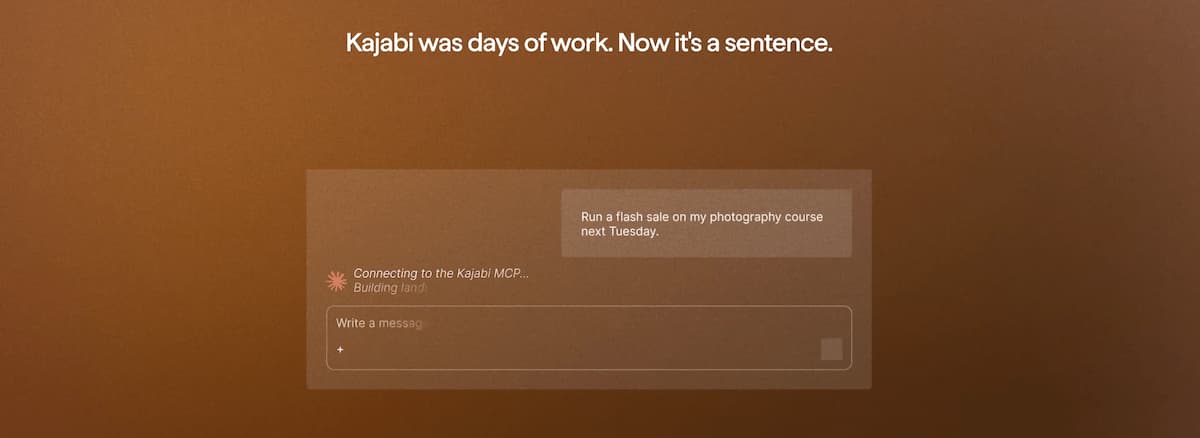
I put together 10 simple prompts you can copy and use right away, no editing required. They're grouped into three areas: making your existing pages and blogs easier to find, improving the blog itself, and building or fixing pages. Every prompt below has been run for real by me personally, with Claude Sonnet 5 and Kajabi MCP, on my own websites, before going into this post.
Want all 11 prompts in one place, ready to copy?
Kajabi MCP prompts to improve your SEO and AI findability
1. Get a Real Answer on What Your Page Should Rank For
Most people jump straight to editing a meta description without first asking whether it's even targeting the right keyword. This prompt forces the research step first, so the rewrite that follows is actually aimed at something.
I want to improve the SEO and AI findability for [page name]. Based on the content, what keywords should this page realistically be ranking for? Check the meta title and description and rewrite them to fit within 60 and 155 characters, with the keyword near the front.
Use this whenever you're touching an older page and aren't sure its meta title still matches what the page is actually about.
2. Check Your H1 and H2s Against Your Target Keyword
A page can have a strong meta description and still miss the mark if the actual headings on the page don't mention the keyword at all. This one checks the structure of the page itself, not just the metadata.
I want to improve the SEO and AI findability for [page name]. Based on the content, what keywords should this page be ranking for? Check whether the H1 and H2s actually contain that keyword, and suggest edits if they don't.
Run this together with the previous prompt. Between the two, you get a page whose metadata and visible headings actually agree with each other.
3. Write Alt Text People (and Screen Readers) Actually Understand
Alt text is one of those things everyone knows they should do and almost nobody keeps up with. This prompt asks for alt text that describes what's actually in the image, not just a keyword stuffed into a sentence.
Look at every image on [page name], work out what each one is actually showing, and write alt text that describes it accurately for someone using a screen reader, not just the keyword stuffed in. Flag any image block where the alt text doesn't seem to render, so I know if it's a real gap or a display issue.
That last part matters more than it sounds. Kajabi's card blocks in the Encore template have a long-standing bug where you can't add alt text at all, no matter what you type into the field. If you build your landing page with Kajabi MCP on the Nova template instead, this is already fixed.
4. Build Contextual Internal Links Automatically
Internal links help visitors find more of what you've written, and they help Google understand how your pages relate to each other. The problem is that adding them by hand takes forever, so most sites end up with far fewer than they should have. This prompt has the AI actually read your other pages first, instead of guessing which ones might be related.
Look at [page or post name]'s topic and figure out which 3 to 5 of my other published pages or posts are most relevant to it. For each, suggest where in the existing text a contextual link would fit naturally, with varied anchor text, not just a list of links to bolt on at the end.
This works best on a site with enough published content to actually link between. On a small site it may only find one or two genuine matches, which is a fair result, not a failure.
MCP Prompts for blogs and blogging on Kajabi
5. Get an Honest SEO and Readability Review
This is the prompt to run before you hit publish, or on any older post that's underperforming and you're not sure why. It's hard to judge your own writing objectively right after you've finished it. Keyword coverage, heading structure and sentence length are all easier to spot in someone else's post than your own, and this gives you that second pair of eyes without waiting for someone to be available.
Review [blog post name] for SEO and readability. First tell me what's actually working and what's weak: keyword coverage, heading structure, sentence length. Then give specific edits, not general advice.
The first half matters as much as the second. Asking for a diagnosis before the fix means you get an answer you can actually learn from, not just a list of changes to apply blindly.
6. Generate or Fix Your FAQPage Schema
FAQ schema is a small piece of hidden code on the page that tells Google and AI tools exactly which questions and answers appear there, without them having to read and interpret the whole page themselves. It matters for SEO because it can earn your page extra space in the search results, sometimes as an expandable question right under your listing. It matters even more for AI, since tools like ChatGPT lean on this structured data when deciding whose answer to quote. Writing this code by hand is fiddly and easy to get wrong. This prompt writes it for you and keeps it lined up with what's actually visible on the page.
Check if [blog post name] has FAQPage JSON-LD. If it doesn't, write one that matches the visible FAQ accordion word for word, and add it to the top of the post content. If it already has one, check it still matches the accordion and fix any mismatch, in the content, not just as a suggestion.
The instruction to actually add it to the post, not just hand you a code block, is what turns this from a ChatGPT prompt into a genuine Kajabi MCP prompt. It does the work, it doesn't just describe the work.
7. Find New Blog Post Ideas Backed by Real Search Data
Brainstorming new blog topics usually means either staring at a blank page or repeating an idea you've already covered without noticing. This prompt makes the AI check both your own site and real search data before suggesting anything.
Look at what I've already published, then research what people are actually searching for around [topic or keyword]. Suggest 5 new blog post ideas that don't overlap with what I already have, each with a one line angle explaining why it's different from the rest.
If one of the five ideas is close to something you've already published, a good answer will say so and explain what makes it different anyway, rather than quietly leaving it out.
8. Turn a Blog Post Into a Newsletter Email
This prompt turns your latest blog post into a real draft broadcast email inside Kajabi, ready for you to review and send whenever you're ready. Repurposing content sounds simple until you try it by hand and end up with an email that just reads like a shorter version of the blog post. This one asks for a pitch, not a summary.
Take my latest blog post and figure out the single most useful takeaway for someone who hasn't read it yet. Turn that into a draft broadcast email, not a summary, an actual pitch to click through, in my tone, with a subject line and a link back to the full post.
This creates an actual draft broadcast inside Kajabi, sitting at zero recipients until you review and send it yourself.
Kajabi MCP landing pages prompts
9. Build a New Landing Page From Scratch
This is the closest Kajabi MCP gets to "build me a page," and it works best when you make it think before it builds.
I want a new landing page for [purpose]. Before building anything, tell me what this page needs to convince a visitor of, and what sections that implies. Then create the page and fill in a hero section, one benefits section, and a CTA, using my existing brand colors and fonts.
Expect a real, working page with a hero, a benefits section and a call to action already in place. It won't be a finished, polished sales page yet. Think of it as a strong first draft you can build on, not a blank page you're starting from scratch.
10. Find and Fix Incomplete or Placeholder Content
Every Kajabi site has at least one page with leftover placeholder text nobody noticed after the template was installed. This prompt goes looking for it.
Go through [page name] section by section and find anything incomplete, placeholder, or inconsistent with the rest of my site: tone, claims, missing links. Fix what you can using content already on my site as reference, and tell me what still needs my input.
I ran this on a brand new page built from a default preset and it caught genuine stock placeholder text I hadn't noticed myself. It's a good habit to run on any page you didn't build entirely by hand.
What Is the Kajabi Nova Theme, and Should You Use It?
While testing the page-building prompt above, I ran into something almost nobody outside Kajabi has written about yet: a second page-building engine called Nova, sitting quietly next to the page builder you already know.
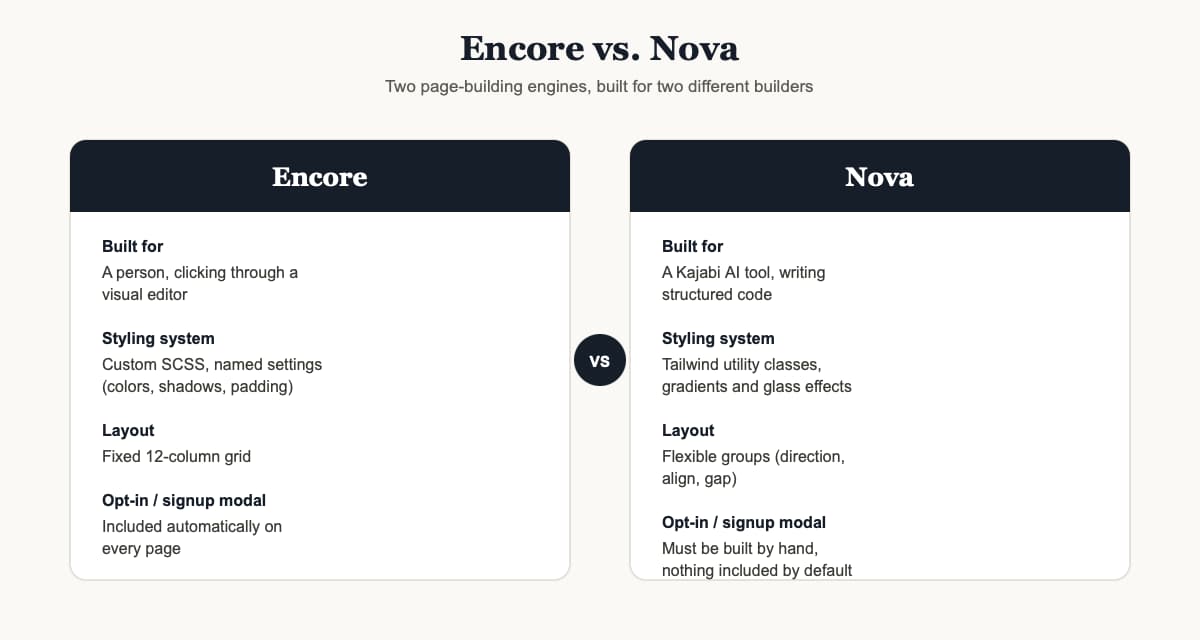
Nova is a newer engine built specifically for AI tools to build pages through, using a modern styling system instead of the older one Encore relies on. You won't find it in the regular template picker. The only way to reach it right now is by asking an AI tool connected through Kajabi MCP to build a page on it specifically.
Can you edit a Nova page yourself afterward? Yes, through the normal Kajabi page builder, the same way you'd edit any other page. But you didn't choose Nova by clicking anything. It only gets used when it's explicitly asked for, which today mostly means when an AI tool reaches for it on your behalf.
Why does Kajabi need a second engine at all? Because Encore was built for a person clicking through a visual editor, and Nova was built for a Kajabi AI tool writing structured code. The two need different things. A person wants sliders, color pickers and a live preview. An AI works better with clear rules, numeric values and a system that tells it exactly what went wrong when something doesn't fit.
For most of what you'll ask Kajabi MCP to do, this distinction won't matter. It builds on whichever engine your page already uses. But if you ask for a brand new, visually rich page and want to know why it suddenly looks a little different from everything else on your site, this is why.
Bonus: Build a Fully Designed Landing Page With Nova
11. Go Fancy: the Full Nova Build Prompt
The first landing page prompt earlier in this post gives you a solid, working page. This one is for when you want something that actually looks finished the first time you open it, built specifically on Nova.
Build a visually rich landing page for [purpose] on the Nova theme engine, not just placeholder text. Use a full-width hero, a stats or social-proof row, a card-style feature grid with shadows, a testimonial section, an FAQ accordion, and a strong closing call-to-action. Use my brand colors throughout, and tell me clearly which images you left blank for me to upload. Give a name to every block as well as every section, and if any button needs a popup or opt-in form, build a real modal block for it, don't reference a modal that doesn't exist on the page.
Nova gives you room to get more playful with styling than Encore ever could. Ask it for a gradient background behind your call to action, a soft glass effect behind a quote, or a subtle hover animation on a button, and it can actually deliver that, since it's built on the same modern styling system professional web designers use. Once you start experimenting with prompts like this, you'll quickly see why Nova was built the way it was. It's the first Kajabi template made specifically for AI to design with, not for a person clicking through a builder.
Final Thoughts
Every one of these 11 prompts is refreshingly simple. That's kind of the point. Kajabi MCP isn't going to reinvent how you run your business, but it will quietly take over the parts of the job that were never the interesting part anyway: the meta descriptions, the internal links, the placeholder text nobody got around to replacing. Start with one or two prompts that match what's already on your to-do list, and let the rest become useful once you see how it actually behaves inside your own account. And if you're still wondering whether you need any technical knowledge to use Kajabi MCP at all, I answered that in more detail in that first Kajabi MCP post.
About the creation of this blog post: The content and structure is written by the author with help of ai. The technical part is fully done with Claude Sonnet 5 and Kajabi MCP. Posting, publishing, adding alt tags, adding styling, creating backlinks and adding an FAQschema (JSON-LD) is all done by the Kajabi MCP. Then the PDF was created based on this blog by Claude. Kajabi MCP created the opt-in page, thank-you page and the opt-in form. But it could not create the email with the pdf that is sent. I had to add this email by hand. This blog is a real live example of the use of Kajabi MCP. From the first blank idea: creating a new blog about MCP to the end: published blog and pdf funnel, took me about 6 hours. Still a lot imo. But if I had done this 2 years ago, it would have cost me 3 or 4 days. Conclusion, there is still work to be done, but you can do way more with ai and mcp.
About the author
Bastiaan de Koning is a Kajabi Legend Partner, working with Kajabi since 2014. Through Jiffy Courses Online he builds templates and tools for Kajabi creators, and writes about what actually works when running a Kajabi business, AI included.
Frequently Asked Questions
Is it safe to give Kajabi MCP access to my account?
Yes, as long as you're deliberate about the permissions you grant. Kajabi lets you approve read-only access first and add the ability to create drafts later, once you've seen how the AI behaves. Nothing it creates goes live without you reviewing and publishing it yourself.
Does using Kajabi MCP cost anything extra?
Kajabi MCP itself doesn't have a separate price tag beyond your existing Kajabi plan. What it does depend on is the AI tool you connect it to, since some AI assistants require a paid plan of their own to use tool connections like this one.
What happens if a prompt makes a mistake?
Every page, post or email Kajabi MCP touches is saved as a draft or applied directly to content you can still edit or revert inside Kajabi. Nothing publishes automatically, so a mistake is something you catch on review, not something your visitors see.